
Add a Registered Biller to Virginia PRSS
By George Ruan • June 9, 2026
Last updated: June 9, 2026.
Use this guide when your biller already has Virginia Medicaid Provider Portal credentials from another provider. In PRSS, that person is a Registered Delegate. You add your practice to the biller’s existing account using their last name and Relationship Code.
Has the biller never registered for PRSS? Use the Unregistered Delegate instructions instead. The first provider must create the biller’s delegate profile before the biller can register.
Sections
What You Need From the Biller
Last name: use the last name shown in the biller’s PRSS delegate profile.
Relationship Code: the biller can find this code in PRSS under Maintenance, then Portal Profile Maintenance.
Required service locations: identify every location the biller will work for.
Required security functions: decide whether the biller needs eligibility, claim search, claim entry, payment history, remittance files, provider maintenance, revalidation, or secure messaging.
How the Biller Finds Their Relationship Code
Sign in to MES using the biller’s existing credentials.
Open Provider Management, then the PRSS Portal.
From the PRSS navigation menu, select Maintenance, then Portal Profile Maintenance.
Copy the Relationship Code from the delegate’s account profile and send the code with the delegate’s last name to the provider.
The Relationship Code appears in the delegate profile:
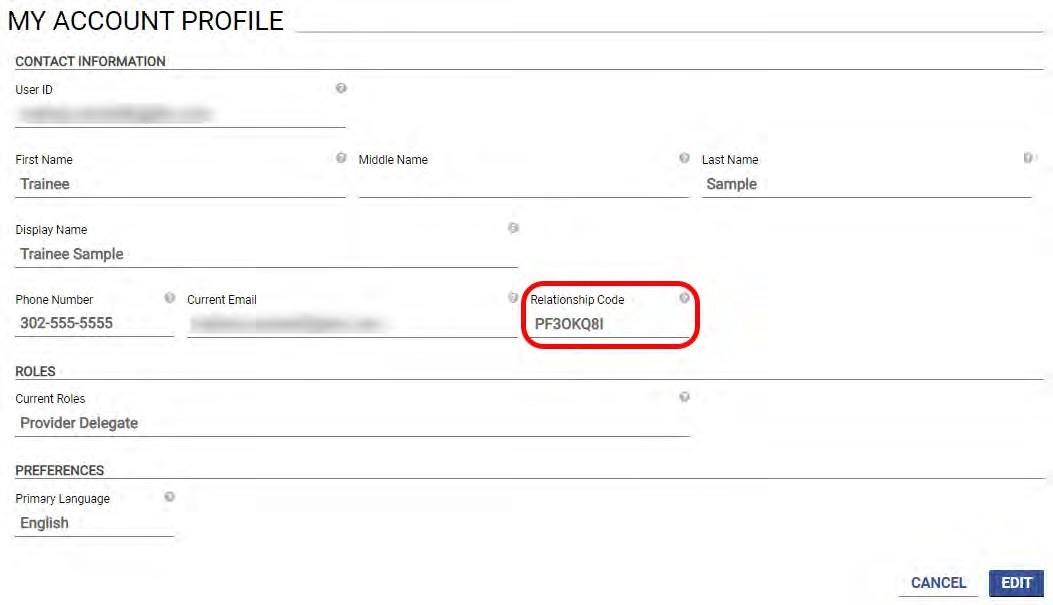
Screenshot source: Figure 50 from the Virginia Provider Portal User Guide, Release 30.21, April 2026. © Gainwell Technologies.
The Relationship Code is what allows an additional provider to attach its service locations and functions to the biller’s existing account. The biller should not send a password or share login credentials.
How to Add a Registered Biller
Log in to MES. Use the blue login button on the Virginia Medicaid MES site, open Provider Management, and enter the PRSS Portal.
Open Manage Delegates. From the PRSS navigation menu, select Maintenance, then Manage Delegates.
Choose Add Registered Delegate. Do not create a second unregistered profile for someone who already has Provider Portal credentials.
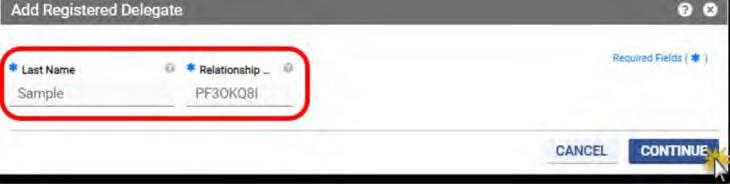
Enter the biller’s last name and Relationship Code. Click Continue so PRSS can validate the existing delegate.
Verify the delegate. Review the validated delegate information before assigning access.
Assign service locations. Choose all locations the biller needs. Access to one location does not automatically include the provider’s other locations.
Assign security functions. Choose the portal functions required for the biller’s work. PRSS requires at least one function for each active location being configured.
Submit the delegate. After confirmation, the biller can access your account from Switch Provider in PRSS.
What the PRSS Screens Look Like
Step 1 — Choose Add Registered Delegate.

Step 2 — Enter the biller’s last name and Relationship Code, then continue.
Step 3 — Select service locations and security functions, then submit.
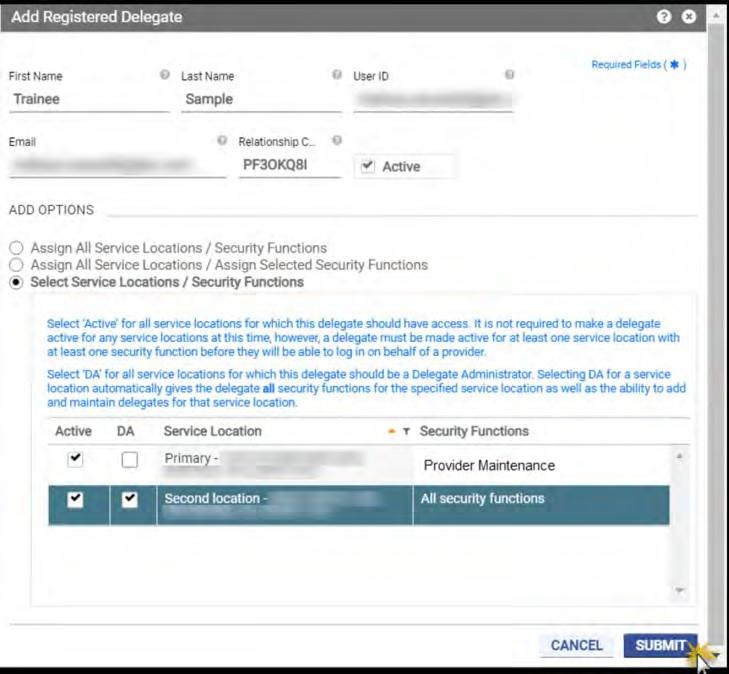
Screenshot source: Figures 130, 131, and 133 from the Virginia Provider Portal User Guide, Release 30.21, April 2026. © Gainwell Technologies.
Which Permissions Should a Biller Receive?
Select access according to the work the biller performs. Common PRSS security functions for a billing or credentialing partner include:
Automated Response System (ARS): claim search, eligibility verification, and payment history.
Claims Entry: direct claim submission when the biller uses PRSS for DDE claims.
Resources File Download: provider and claim letters, remittance advice, and revalidation notices.
Maintenance – Manage My Information: viewing and updating provider information.
Maintenance – Revalidation: viewing revalidation information and due dates.
Message Center – View and Send Messages: secure correspondence with PRSS staff.
Delegate Administrator access includes all functions and the ability to manage other delegates. Assign that role only when the biller is supposed to administer delegate access for the practice.
How to Verify the Access
Have the biller sign in with their existing MES credentials.
Open Provider Management, then the PRSS Portal.
Use Switch Provider and confirm your practice appears in the provider list.
Open each assigned service location and confirm the expected claims, eligibility, payment, maintenance, or resource functions are available.
If PRSS Does Not Validate the Delegate
Confirm the last name matches the delegate profile, including spelling and punctuation.
Ask the biller to recopy the Relationship Code from PRSS.
Confirm the biller completed Provider Portal registration. If they never registered, switch to the Unregistered Delegate process.
If the biller is already listed but inactive, reactivate the existing delegate instead of adding the person again.
PRSS Access Does Not Cover Every System
Adding a Registered Delegate covers the provider and service locations you authorize in PRSS. Cardinal Care MCO portals, Acentra/Atrezzo service authorization, clearinghouses, EFT/ERA tools, and EHR systems can require separate access.
Where Bomi Fits
Bomi helps therapy practices keep Medicaid billing and credentialing workflows organized: enrollment follow-up, portal handoffs, eligibility checks, claims, denials, EOB review, revalidation tracking, payer follow-up, and revenue operations. We still separate access correctly: your practice keeps control of provider accounts, and each user gets the access needed for their role.
Operational note: This post is general operational education, not legal, compliance, or billing advice. Confirm current DMAS, MES/PRSS, Cardinal Care MCO, Acentra/Atrezzo, provider-manual, and contract requirements before submitting enrollment, claims, or service authorizations.
Sources
Want Bomi to handle insurance billing?
Bomi helps therapy practices with benefit checks, claims, denials, balances, CAQH, attestations, and revenue management.
Talk to Bomi about billing