
Get a PaySpan Registration Code for Bomi
By George Ruan • August 26, 2026
Last updated: August 25, 2026.
Some payers use PaySpan for electronic payments and remittances. When Bomi needs to help with PaySpan enrollment, the simplest handoff is for the practice to request a PaySpan registration code and give that code to Bomi through Bomi’s approved secure channel.
Keep your account secure: send Bomi only the registration code and payer name through Bomi’s approved secure channel. Do not send a PaySpan password, multi-factor authentication code, bank-account number, routing number, or micro-deposit amount by ordinary email or text.
Sections
Why Your Practice Needs to Request the Code
The registration-code request is the start of payment enrollment for your practice, so it must be initiated by the practice or an authorized first-party representative. Bomi cannot submit it as though we are your provider, practice owner, or payment-account administrator.
The form asks for practice-owned information, including the provider tax ID, NPI, contact details, billing address, and affected payer.
The practice needs to confirm that the payer and payment-enrollment request are correct before it is sent.
After the practice receives the registration code, Bomi can continue the work from that code without asking for your PaySpan login or bank details.
Before You Start
Use the practice’s legal name and the provider or organization identifiers that appear in its payer records.
Step 1: Request the Registration Code
This is PaySpan’s public request form with example-only values. Replace them with your practice’s payer-enrollment information; the example was not submitted.
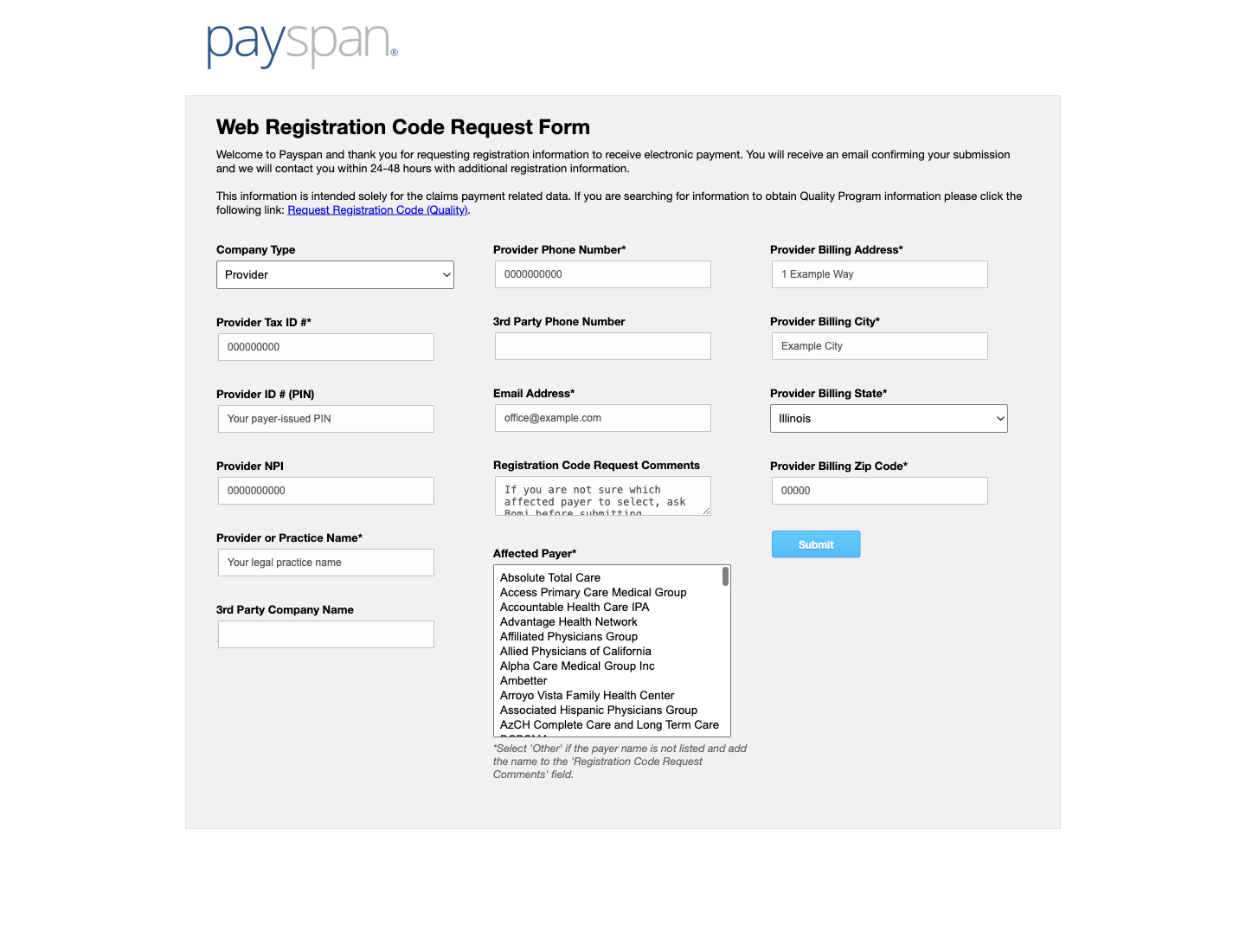
Open PaySpan’s official registration-code form. Go to PaySpan Request Registration Code.
Complete the practice information. PaySpan’s public form asks for organization and contact information and may ask for the provider tax ID, PIN, NPI, affected payer, and billing address. Use the information associated with the payer enrollment.
Choose the affected payer. Select the payer for which you need PaySpan enrollment. If you are not sure which payer to choose from PaySpan’s list, ask Bomi before submitting the request rather than guessing.
Submit the request and watch for PaySpan’s response. The public form says PaySpan sends an email confirmation and may contact you within 24–48 hours. Follow the instructions in the message PaySpan sends to your practice.
Step 2: Send the Registration Code to Bomi
Keep the code with the practice until you are ready to share it. The code is specific to your registration request. Do not post it in a group chat, a shared document, or ordinary email.
Use Bomi’s approved secure channel. Send only the registration code and the payer name through the secure method Bomi has provided. If you do not have that method, ask Bomi for it before sending the code.
Keep financial verification with the practice. If PaySpan asks for bank details, agreement acceptance, or micro-deposit verification, the authorized practice representative should complete those steps directly with PaySpan.
Frequently Asked Questions
Where do I request a PaySpan registration code?
Use PaySpan’s official Request Registration Code page at payspanhealth.com/RequestRegCode/. Complete it with the legal practice and payer-enrollment information PaySpan requests.
Should I share my PaySpan password, MFA code, or bank details with Bomi?
No. Do not share a password, multi-factor authentication code, bank-account number, routing number, or micro-deposit amount. Provide only the registration code and payer name through Bomi’s approved secure channel.
Sources
PaySpan: Request Registration Code — the official public request form and its stated registration-request timing.
Want Bomi to handle insurance billing?
Bomi helps therapy practices with benefit checks, claims, denials, balances, CAQH, attestations, and revenue management.
Talk to Bomi about billing