
NCTracks: Add a Billing Agent
By George Ruan • August 18, 2026
Last updated: August 18, 2026.
Bottom line: if a biller or clearinghouse will submit NC Medicaid claims for your practice, add the Billing Agent relationship to every billing NPI they will use. A portal login is a separate user-access task; do not share your NCID, password, or PIN with a biller.
This guide is for North Carolina Medicaid practices that use an outside biller, revenue-cycle company, or clearinghouse. NCTracks says a Billing Agent relationship must be on the provider record before that agent can submit claims for the provider. The relationship is configured through a Manage Change Request, or MCR.
The detail that causes confusion is that access and claims authority are different. A named person can be granted a role in the secure portal through User Administration, while a Billing Agent association tells NCTracks which agent can send and receive electronic transactions for a billing NPI. Depending on what the biller will do, a practice may need one of those setups or both.
Sections
- Portal Access vs. Billing Agent: Which Do You Need?
- Before You Start
- Step 1: Start a Manage Change Request for the Billing NPI
- Step 2: Choose the Transaction Setup Deliberately
- Step 3: Associate the Billing Agent
- Step 4: Assign Transaction and 835 Responsibility
- Step 5: Review, Sign, and Save Proof
- If Your Biller Also Needs Portal Access
- When the Relationship Ends
- What This Does Not Replace
- Where Bomi Fits
- Sources
Portal Access vs. Billing Agent: Which Do You Need?
Portal user access: an Office Administrator or User Administrator provisions a person's own NCID and roles in User Maintenance. This is how an authorized person enters the secure provider portal.
Billing Agent relationship: the provider record associates a billing agent or trading partner with the billing NPI for claims and electronic-transaction routing.
Both: some billing arrangements need both a named portal user and a Billing Agent association. Confirm the required role and transaction model with the biller before you submit the MCR.
Keep logins personal. NCTracks says access is controlled per NCID and advises against sharing NCIDs. Give each authorized person their own access, then use the provider-record relationship for a billing agent.
Before You Start
Gather these details first:
Each billing NPI. NCTracks says the Billing Agent relationship is required for every Billing NPI that the agent submits for.
The biller's exact registered details. Ask for the NCTracks Billing Agent ID when available, or the exact organization name to search. Do not select a similar-looking result without confirming it with the biller.
Your 835 preference. Decide whether the billing agent should receive all electronic transactions, including remittance advice, or whether the practice should receive the 835 directly.
An authorized NCTracks signer. The person completing the MCR needs their own approved portal access and the information required for electronic submission.
Step 1: Start a Manage Change Request for the Billing NPI
Go to NCTracks, open the Providers tab, and log in through the Secure Provider Portal.
Open Status and Management.
In Manage Change Request, select the active billing NPI that needs the association and choose Update.
Use Next through the application rather than jumping around the left menu. NCTracks requires each page to be reviewed before submission.
If the Manage Change Request section has no data, the NCTracks job aid says to check Saved Applications and Submitted Applications first. A draft or pending MCR can prevent a new one for that record.
Step 2: Choose the Transaction Setup Deliberately
Continue to Method of Claim and Electronic Transactions. Select Billing Agent when the agent or trading partner will handle the electronic-transaction work. The NCTracks job aid recommends also leaving the single-claim portal option available so the practice can submit an individual claim when needed.
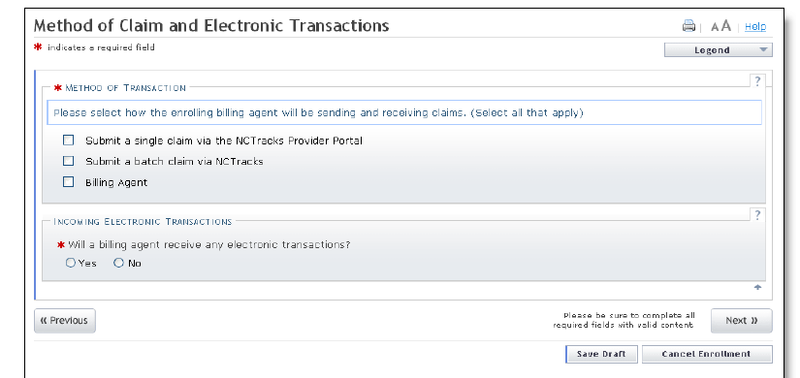
Screenshot source: NCTracks job aid for adding or changing a Billing Agent, page 5.
Decide 835 routing before checking boxes. The official guide says that a Billing Agent setup without the Batch Claim option routes all electronic transactions to the agent or trading partner. If you also select Batch Claim, NCTracks routes the 835 remittance advice to the provider by default. A practice that wants the agent to submit inbound batch claims but keep the 835 needs the combined configuration and the related Trading Partner registration and testing steps.
This choice affects where payment and claim-response information goes. Confirm the intended flow with the biller before submitting; do not select a transaction model just because the agent appears in a search result.
Step 3: Associate the Billing Agent
On Associate Billing Agent, select Yes to search for a new billing agent.
Search by the Billing Agent ID, or by the exact agent name or organization name provided by your biller.
In the results, select the correct agent, enter the requested begin date, and choose Add.
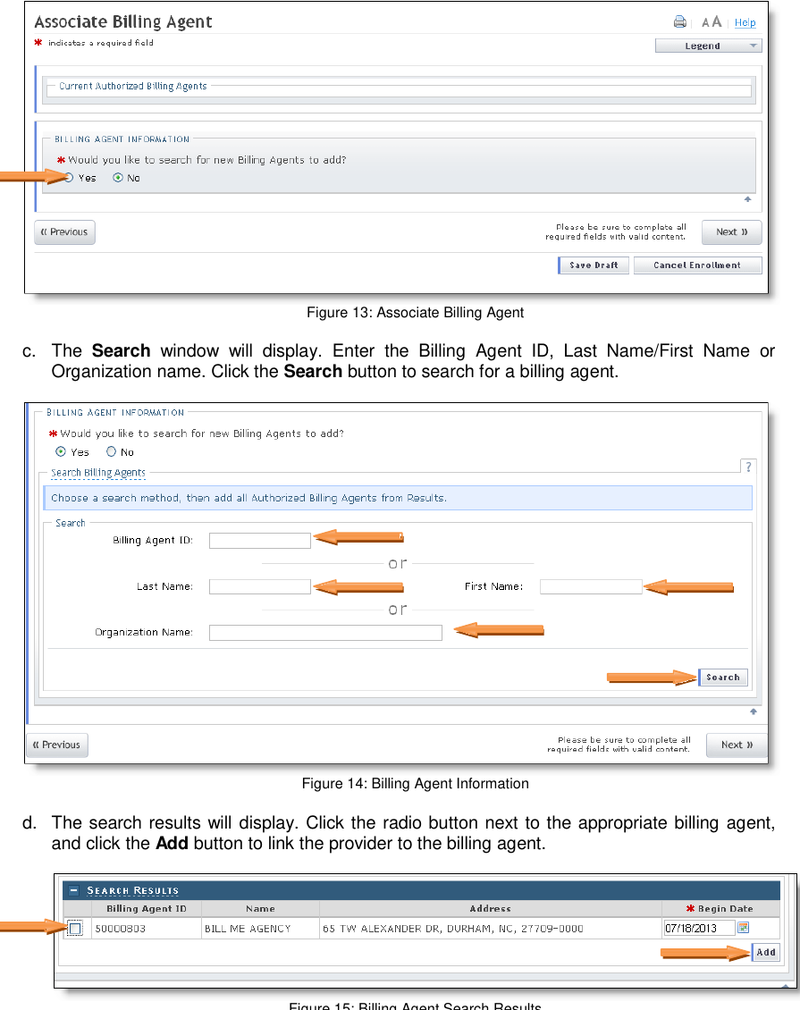
Screenshot source: NCTracks job aid for adding or changing a Billing Agent, page 13.
NCTracks permits more than one Billing Agent for a billing NPI. That does not mean each agent should receive the same transactions, so continue to the next screen and confirm the routing choice.
Step 4: Assign Transaction and 835 Responsibility
On Selected Authorized Billing Agents, NCTracks lets a practice designate which agent receives electronic transactions. The public guide shows choices for all transactions or 835 only. When more than one agent or trading partner is associated, match the transaction type and Billing Agent ID to the arrangement you confirmed with each vendor.
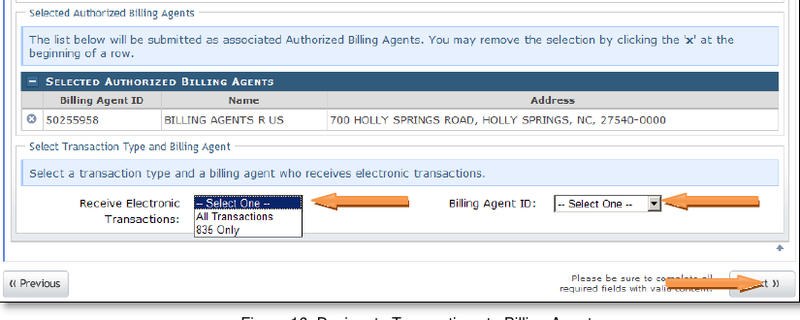
Screenshot source: NCTracks job aid for adding or changing a Billing Agent, page 14.
Step 5: Review, Sign, and Save Proof
Continue with Next through the remaining MCR pages. Before signing, open Review Application and confirm each page in the left-side list has a green check mark. Verify the contact email as well. Save Draft only preserves work; it does not submit the request for processing.
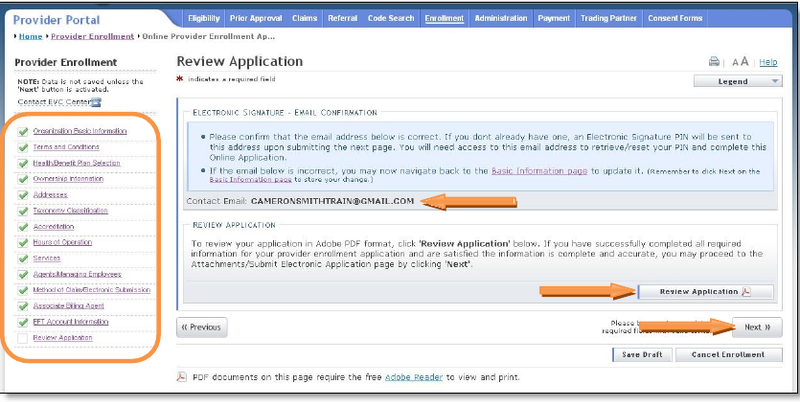
Screenshot source: NCTracks job aid for adding or changing a Billing Agent, page 18.
Complete the electronic signature using the authorized signer's own NCID, password, and PIN, then select Submit Now. Save or print the final submission and the configuration you chose for your records.
If Your Biller Also Needs Portal Access
Do not hand over an existing login. The Office Administrator or User Administrator can add or maintain named users from User Administration, then User Maintenance. Give the person their own NCID and only the roles needed for the work they will perform. This is separate from adding the Billing Agent relationship on the provider record.
If an outside biller is only submitting claims through its billing-agent or clearinghouse connection, confirm whether a separate portal-user role is actually needed before provisioning one.
When the Relationship Ends
Remove a former billing agent from the provider record through the current MCR workflow once the practice has confirmed that no further transactions should route to that agent. The NCTracks job aid shows an X control beside the associated agent. If the person also had a separately provisioned NCID, review and deactivate or adjust that user in User Maintenance as a separate access-control task.
What This Does Not Replace
Provider enrollment. A Billing Agent relationship does not enroll a new provider or location in NC Medicaid.
Individual-to-group affiliation. If an individual clinician must affiliate to a group and add the group service location, use the separate full MCR workflow for that record update.
Managed-care network participation. NCTracks billing setup does not make a provider contracted or credentialed with every NC Medicaid managed-care plan.
Where Bomi Fits
If Bomi will submit NCTracks claims for your practice, we can confirm whether a Billing Agent relationship is needed, provide the exact registered details to use in the search, and document the intended transaction and 835 routing before you submit. Bomi does not need your NCID password or PIN. When an owner or authorized administrator must sign, we keep that handoff specific and preserve the proof needed to follow up on the request.
This post is for general operational education and is not legal, compliance, credentialing, or billing advice. Confirm current NC Medicaid, NCTracks, clearinghouse, and managed-care-plan requirements before changing provider records, electronic-transaction routing, or user access.
Sources
Want Bomi to handle insurance billing?
Bomi helps therapy practices with benefit checks, claims, denials, balances, CAQH, attestations, and revenue management.
Talk to Bomi about billing