
Nevada Provider Flex: Give Biller Access
By George Ruan • August 12, 2026
Last updated: August 12, 2026.
Bottom line: Nevada Medicaid does not document an owner-side "Add Delegate" control inside Provider Flex. A biller uses a personal Delegate account. The provider can create or link that delegate in the Provider Web Portal (PWP), and an already-active Provider Flex application can be transferred to the delegate by exact User ID. Do not share the owner login.
This guide is for a Nevada behavioral-health group or other practice using an outside billing or credentialing company for fee-for-service enrollment. Nevada uses two connected systems: Provider Flex for enrollment applications and the Provider Web Portal (PWP) for provider administration, delegate relationships, revalidations, updates, claims, and other functions. Treat the account relationship and the application itself as two separate things.
Sections
- The Three Actions Are Different
- What to Collect Before Starting
- New Delegate: Provider Steps in PWP
- New Delegate: Biller Registration Steps
- Existing Delegate: Link the Current Account
- If a Provider Flex Application Already Exists
- What the Provider Must Still Do
- Security and Offboarding
- Common Mistakes
- Where Bomi Fits
- Sources
The Three Actions Are Different
Create a personal Delegate account. This gives one named biller their own User ID, password, and account-specific MFA. Nevada says each user performing work for a provider should have a personal delegate account.
Link the delegate to the provider in PWP. The provider administrator uses Manage Accounts, then Add New Delegate or Add Registered Delegate, and chooses the functions the person may use in PWP.
Transfer an active Flex application. If someone else already created the Application Tracking Number (ATN), that original creator transfers the application to the biller from the Flex Dashboard using the biller's exact User ID.
Nevada's Provider Flex Getting Started guide confirms that existing PWP credentials work in Flex. A PWP Provider account is limited to enrollments for its NPI, while a PWP Delegate account may manage enrollments for multiple providers.
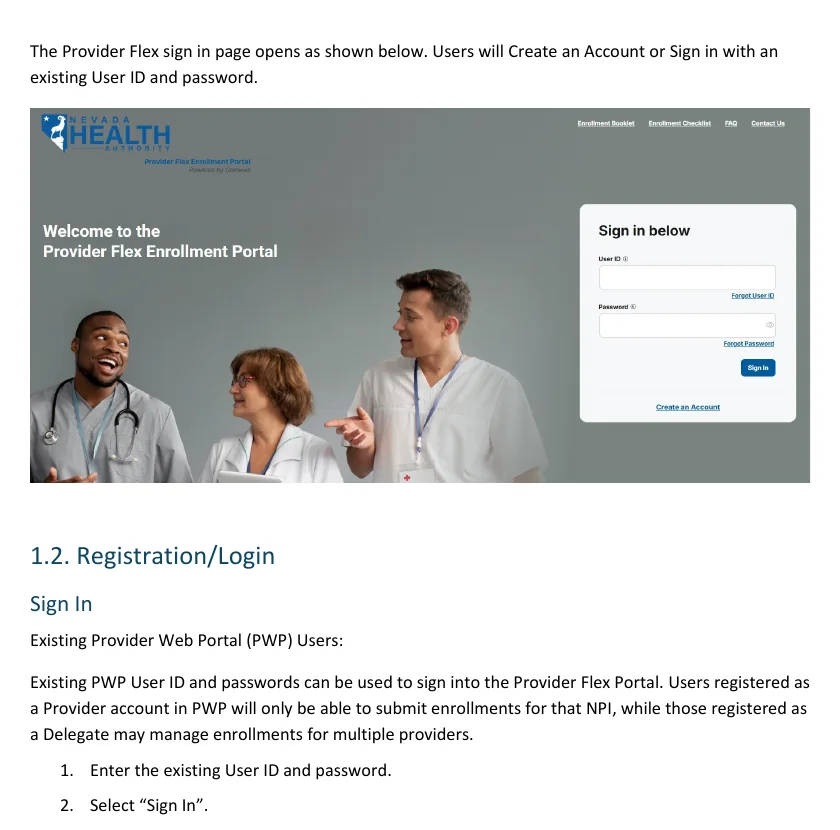
Screenshot source: Nevada Provider Flex User Guide: Getting Started, manual page 3.
What to Collect Before Starting
The biller's own legal identity: first name, last name, date of birth, and last four digits of the biller's driver's license number (DLN). These are not the provider owner's identity fields.
A unique work email and phone number: use contact information controlled by the named biller. Do not use a shared inbox or phone number as the MFA identity for several users.
The required PWP functions: decide whether the biller needs Provider Enrollment - Revalidate/Update, eligibility, claims, file exchange, or other listed functions. Select only the functions required for the work.
The Flex User ID and ATN, if an application already exists: verify both values directly before transferring anything. A transfer moves dashboard control away from the original creator.
Handle identity data securely. The delegate registration process uses DOB and the last four DLN digits. Exchange them through an approved secure channel, not ordinary email or a general support ticket, and do not store them in application notes.
New Delegate: Provider Steps in PWP
Use this path when the specific biller has never registered as a Nevada Medicaid PWP Delegate. The provider or practice administrator performs these steps.
Sign in to PWP as the registered provider administrator. Nevada allows one registered Provider administrative user for each NPI, FEIN, and ZIP combination. That user controls delegate assignments.
Open Manage Accounts. From My Home, select the Manage Accounts link in the provider panel.
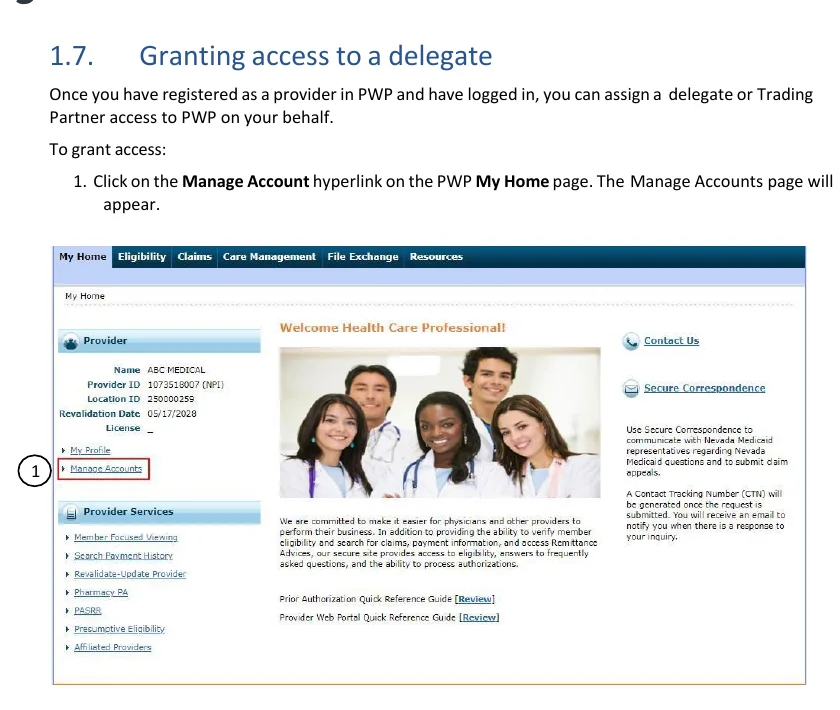
Screenshot source: Nevada Medicaid PWP User Manual Chapter 1, manual page 21.
Choose Add New Delegate. Use this tab only for a person who has never registered as a PWP Delegate. Do not create a duplicate profile for an existing delegate.
Enter the biller's identity fields. Enter the biller's full name, DOB, and last four DLN digits exactly as the biller will enter them during registration.
Choose the PWP functions. At least one function is required. Include Provider Enrollment - Revalidate/Update when the delegate will receive or work on revalidation or update applications.
Submit, review, and Confirm. Check the identity and permissions on the confirmation screen before completing the assignment.
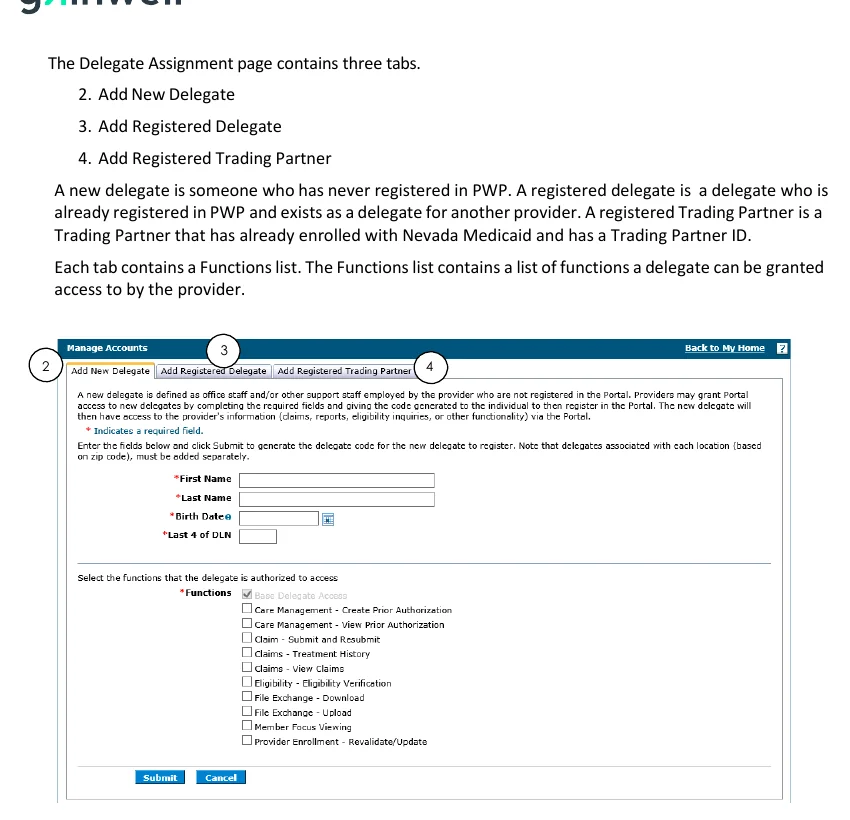
Screenshot source: Nevada Medicaid PWP User Manual Chapter 1, manual page 22.
Record the generated Delegate Code. After confirmation, PWP displays the code that the new delegate needs for registration. Deliver it securely to the named biller.
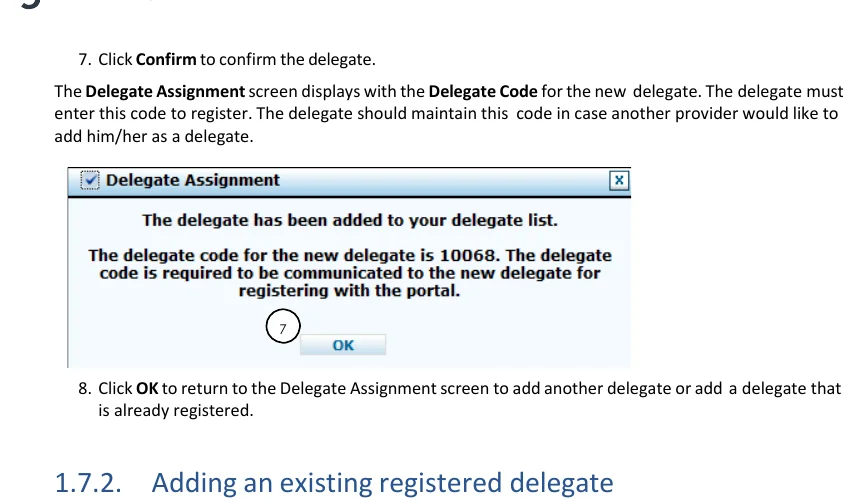
Screenshot source: Nevada Medicaid PWP User Manual Chapter 1, manual page 25.
New Delegate: Biller Registration Steps
Open Nevada's PWP registration instructions. Use the official Nevada Medicaid registration page and follow the Early Provider Web Portal Registration link. Select Delegate, not Provider.
Enter the matching identity and Delegate Code. The first name, last name, DOB, and last four DLN digits must match what the provider entered. Nevada says each Delegate registers only once.
Create an individual User ID and password. Keep the User ID available for any later Flex application transfer. Never give the password to the practice or another biller.
Complete MFA under that same person. Nevada requires account-specific MFA and says multiple users cannot share the same account. Each staff member who needs access should have a separate Delegate account.
Sign in to Provider Flex. Use the new PWP Delegate credentials at Provider Flex and confirm the dashboard loads before anyone starts or transfers an application.
Nevada's July 31, 2026 Getting Started guide also shows a direct Create an Account path in Flex for users without an existing User ID. The live Flex sign-in experience can change and may not show that control. If it is available, the biller still registers with their own identity and MFA; it does not attach the account to an owner's existing application. If it is not available, use the supported PWP Delegate registration path above or contact Gainwell rather than sharing the owner login.
Existing Delegate: Link the Current Account
Use this path when the biller already has Nevada PWP Delegate credentials from supporting another provider. A Delegate registers only once and keeps the same Delegate Code for additional provider relationships.
Get the biller's last name and Delegate Code. Do not ask for the biller's password.
Sign in to PWP and open Manage Accounts. Choose Add Registered Delegate.
Enter the last name and Delegate Code. PWP uses those values to identify the existing delegate.
Choose functions, Submit, and Confirm. Assign only the functions needed for this practice, including enrollment revalidation/update access when applicable.
Have the biller verify the relationship. The biller signs in with their existing credentials and confirms the practice and expected functions are available.
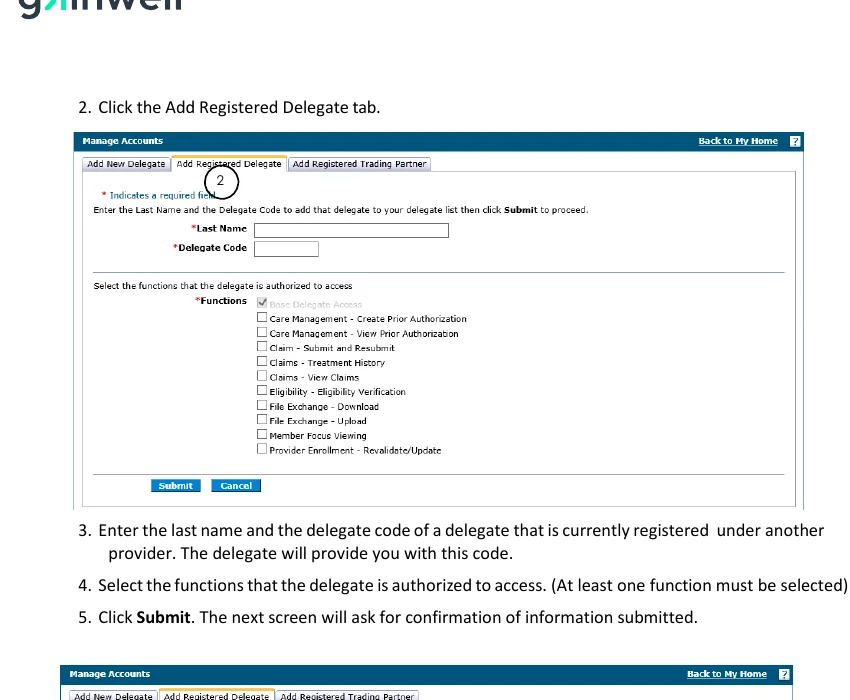
Screenshot source: Nevada Medicaid PWP User Manual Chapter 1, manual page 26.
If a Provider Flex Application Already Exists
Delegate linking does not automatically move an application that another user already started. Nevada's application-transfer feature handles that separately.
Confirm the receiving account is active. The receiver must have an active Provider Flex account as a Delegate or as the Provider matching the application's NPI.
Verify the biller's exact Flex User ID. Have the biller read it from their own account. A display name or email address is not a substitute.
The original creator opens the ATN in the Flex Dashboard. Only the original creator can initiate the transfer of the active application.
Transfer to the biller's User ID. Review the ATN, NPI, and receiving User ID before confirming. For a revalidation or change update, the receiving delegate must also have the appropriate PWP roles.
Verify receipt from both sides. Nevada does not send a transfer notification. The biller should confirm the ATN appears in their dashboard. The original creator loses dashboard visibility after the transfer.
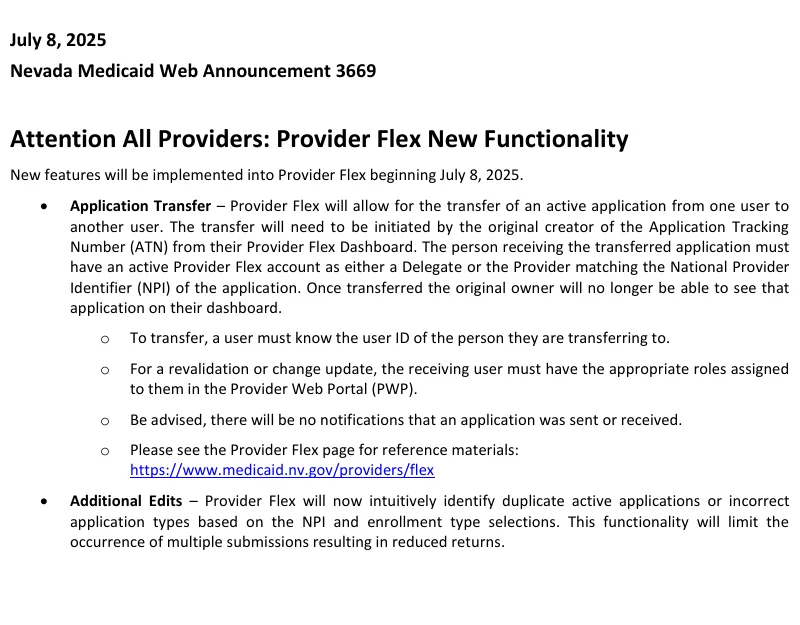
Screenshot source: Nevada Medicaid Web Announcement 3669.
A transfer is not shared access. It moves the active application from one dashboard to another. Do not use transfer as a substitute for named PWP permissions, and do not create a duplicate application when the same ATN can be transferred.
What the Provider Must Still Do
A delegate may prepare enrollment information and manage the application, but cannot sign for the provider, owner, supervisor, or another specified signer. Nevada's Provider Flex FAQ says DocuSign documents are available only to the named signer. Depending on the document, Nevada may require government-ID verification or liveness detection.
Review the completed enrollment information before signature.
Complete each DocuSign envelope sent to the named provider, owner, or other required signer.
Respond promptly if the delegate reports a correction request, expired signature envelope, or identity-verification issue.
Keep the signed enrollment documents and final approval evidence with the practice records.
Security and Offboarding
No shared logins. Nevada's MFA announcement says account sharing is not supported and each user acting for a provider should have a personal Delegate account.
A billing-company employee may use their own identity. The delegate does not need to be the enrolling provider. The identity fields belong to the individual delegate, not the practice owner or a generic company persona.
Grant the minimum PWP functions. Enrollment maintenance, claims, eligibility, and file exchange are separate permissions. Do not grant broad access by default.
Offboard in PWP. When the relationship ends, the provider opens Manage Accounts, selects the delegate, changes the status to Inactive, and confirms that the delegate can no longer access the provider's information.
Review active Flex work before offboarding. Transfer any active application to the correct remaining user before removing access so the practice does not lose operational control of the ATN.
Common Mistakes
Sharing the provider owner's credentials. This conflicts with Nevada's personal-account and MFA rules.
Registering the biller as Provider. A PWP Provider account is tied to the provider NPI. A multi-practice billing user should use a Delegate identity.
Adding an existing delegate as new. Use Add Registered Delegate with the existing code; Nevada says a Delegate registers only once.
Assuming PWP linking moves a Flex ATN. An existing active application still needs a dashboard transfer.
Starting a duplicate Flex application. Search for an existing ATN and transfer it when appropriate before creating another application for the same NPI and enrollment type.
Expecting a transfer email. Nevada says it sends no notification when an application is transferred. Verify the receiving dashboard directly.
Where Bomi Fits
For a Nevada Medicaid enrollment, Bomi can use a named Delegate account, prepare and track the Provider Flex application, coordinate corrections and required signatures, and keep the group and rendering-provider records aligned. The practice owner retains their own credentials and completes the identity-bound signatures Nevada requires.
Sources
This article is an operational guide, not legal advice or a substitute for Nevada Medicaid instructions. Portal labels and screens can change. Verify the current Nevada Medicaid provider resources before changing access or submitting an enrollment.
Want Bomi to handle insurance billing?
Bomi helps therapy practices with benefit checks, claims, denials, balances, CAQH, attestations, and revenue management.
Talk to Bomi about billing