
Give a Biller Access to Kansas Medicaid KMAP
By George Ruan • July 29, 2026
Last updated: July 28, 2026.
Use a delegate account—never share your KMAP password. A billing or credentialing partner who already has KMAP Provider Delegate credentials can be connected to your provider record with the delegate’s last name and Relationship Code. You choose the service locations and portal functions they can access.
This guide is for a Kansas Medicaid provider or practice administrator adding an already-registered delegate. It covers the KMAP menu path, the information you need from the delegate, a least-privilege permission set for credentialing work, and the checks to perform after access is granted.
Sections
Before You Start
Confirm the provider is enrolled in KMAP. Kansas Medicaid managed care organizations can contract or credential a provider only from the provider’s KMAP enrollment. Delegate access cannot replace a missing state enrollment.
Use the provider-side administrator account. The provider or practice user who can open Manage My Delegates must complete the invitation. The delegate cannot add themselves to your provider record.
Ask the delegate for two identifiers. You need the last name shown on the delegate profile and the delegate’s Relationship Code. You do not need their password or security-question answers.
Identify the correct service locations. Access is tied to the provider locations you select. Make sure the practice’s current service address is already present in KMAP.
Add a Registered Provider Delegate
Sign in to the KMAP Secure Portal. Open the KMAP portal and sign in with the provider or practice administrator account that manages delegates.
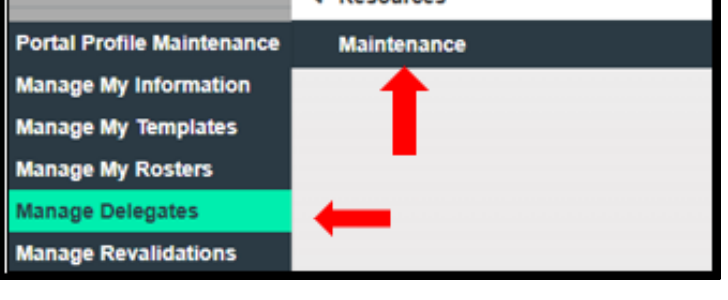
Open Manage My Delegates. Use the upper-right menu, then choose Maintenance → Manage My Delegates.
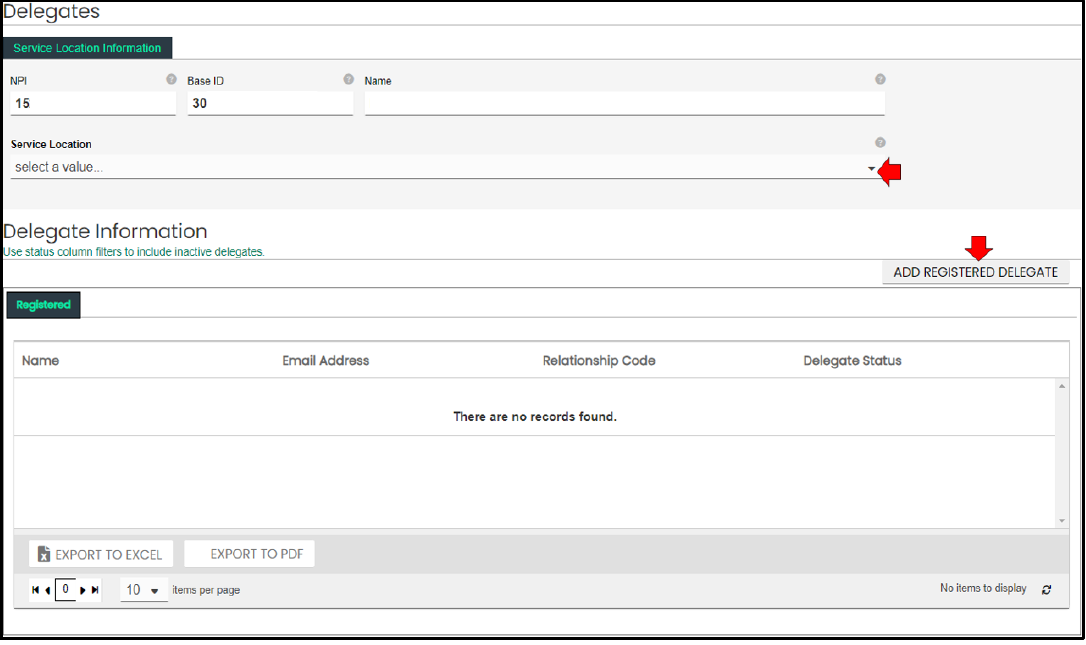
Select the provider location. Choose the Location ID, provider name, and address for the practice whose access you are granting.
Choose Add Registered Delegate. Use this option when the billing or credentialing partner already has their own KMAP Provider Delegate account.
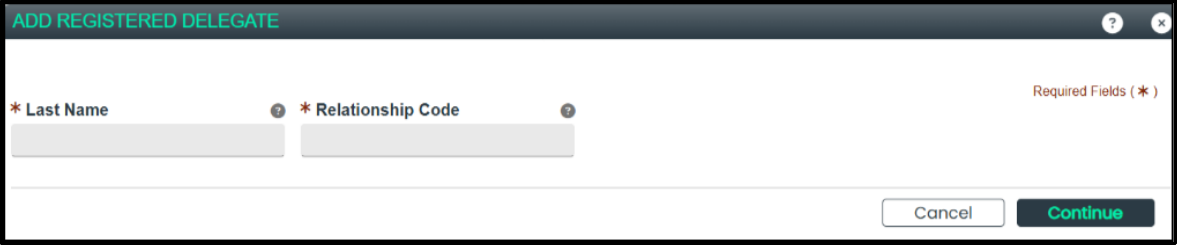
Enter the delegate identifiers. Enter the delegate’s last name and Relationship Code, then select Continue.
Verify the matched account. Check the returned user ID and email against the information your delegate supplied. Mark the delegate Active only after the account matches.
Choose the service-location scope. Grant access to all relevant service locations or select only the locations the delegate will manage. Do not assume one selected location covers every practice address.
Choose Selected Security Functions. Grant only the functions needed for the work. Do not select Delegate Administrator unless the person is specifically responsible for managing other delegates.
Submit and confirm. Review the delegate, locations, and functions before submitting. Save the confirmation shown by KMAP.
What You Will See in KMAP
These cropped examples come from KMAP’s official portal guide. The guide alternates between “Manage My Delegates” in its instructions and “Manage Delegates” in its screenshots; both refer to the delegate-management option under Maintenance.
Open Maintenance, then Manage Delegates.
Select the service location, then choose Add Registered Delegate.
Enter the delegate’s last name and Relationship Code.
Choose Selected Security Functions and move only the required functions into the selected list.
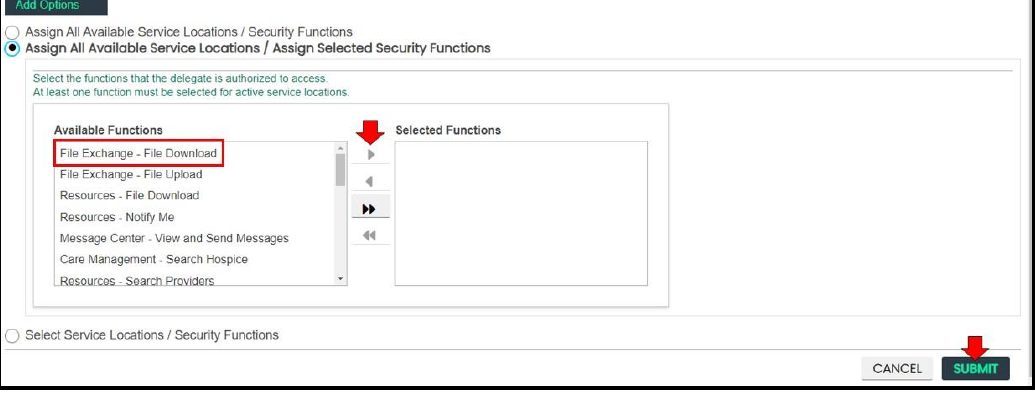
Screenshot source: cropped from pages 21, 22, 128, and 130 of the KMAP Provider Portal Reference Guide, Version 6.1 (2026). © 2026 Gainwell Technologies. The screens contain sample data from the guide.
Least-Privilege Access for Credentialing Work
For a partner handling provider-record maintenance, revalidation, and managed-care enrollment, a practical starting set is:
Maintenance – Manage My Information: review and maintain the KMAP provider record.
Maintenance – Revalidation: review state revalidation information and due dates.
Message Center – View and Send Messages: communicate with KMAP through secure portal messages.
Resources – File Download: retrieve letters and other provider files.
Claims, eligibility, payment, or other functions may be appropriate for a full-service billing relationship, but they are not required merely to maintain credentialing. Add those functions only when the delegate’s actual work requires them.
Verify the Access
Have the delegate sign in with their own KMAP credentials—never yours.
Confirm your provider record appears and that every intended service location is available.
Confirm the assigned maintenance, revalidation, message-center, and file-download functions open successfully.
If the current service address is missing, correct the KMAP enrollment or service-location record before trying to complete managed-care participation.
How This Relates to Sunflower Health Plan
Adding a Provider Delegate does not enroll the provider with Sunflower and is not proof that an application reached the health plan. KMAP enrollment is the state prerequisite. After delegate access is working, the provider record and current service location should be verified, then Sunflower participation can be reviewed through Manage My Information → MCO Network. The provider should not be represented as in-network until an effective Sunflower participation date is confirmed.
Troubleshooting
KMAP cannot find the delegate: recheck the profile last name and recopy the Relationship Code. Confirm the delegate has completed KMAP Provider Delegate registration.
The delegate is already listed but inactive: reactivate the existing relationship instead of duplicating it.
The practice’s current address is missing: the provider’s KMAP service-location record likely needs to be added or corrected before managed-care enrollment can proceed for that address.
The delegate can sign in but cannot open a function: review Selected Security Functions for each assigned location and add only the missing function.
Portal labels and screens can change. Check the current KMAP instructions before submitting a provider-record or managed-care change.
Sources
Want Bomi to handle insurance billing?
Bomi helps therapy practices with benefit checks, claims, denials, balances, CAQH, attestations, and revenue management.
Talk to Bomi about billing