
How to Find Your Health First Colorado Provider ID and Enrollment Effective Date
By George Ruan • August 31, 2026
Last verified: August 31, 2026.
A billing or credentialing team may ask for your individual Health First Colorado Provider ID and an effective date. The confusing part is that Health First Colorado keeps two different date records: the effective date of your individual enrollment and the effective date of your affiliation with a particular group. They answer different questions and should not be used interchangeably.
Short version: Sign in through the official Health First Colorado Provider Web Portal, make sure you are in the individual provider profile, and record the Provider ID shown for that individual. Then follow Provider Maintenance → Provider Maintenance → Group Affiliation Changes to find the effective date tied to the intended group and location. If you need the individual enrollment or contract effective date instead, use the individual provider’s Welcome Letter.
Sections
- First, Know Which Date You Need
- Before You Sign In
- Step-by-Step: Find the Provider ID and Affiliation Date
- If You Need the Individual Enrollment Effective Date
- What You Can Send Your Billing or Credentialing Team
- Never Share the Portal Password
- Common Snags
- Related Colorado Medicaid Guide
- Official Sources and Currency Note
- Frequently Asked Questions
First, Know Which Date You Need
Individual enrollment effective date. This belongs to the clinician’s own Health First Colorado enrollment. HCPF’s current enrollment manual calls it the contract effective date and says an approved backdate appears in the provider’s Welcome Letter.
Group affiliation effective date. This belongs to one relationship between the individual clinician and one enrolled group or service location. A clinician affiliated with several groups can have a different start or end date for each relationship.
If the request simply says “effective date,” ask whether the team means the individual enrollment date or the group-affiliation date. Sending both, clearly labeled, is often the cleanest handoff.
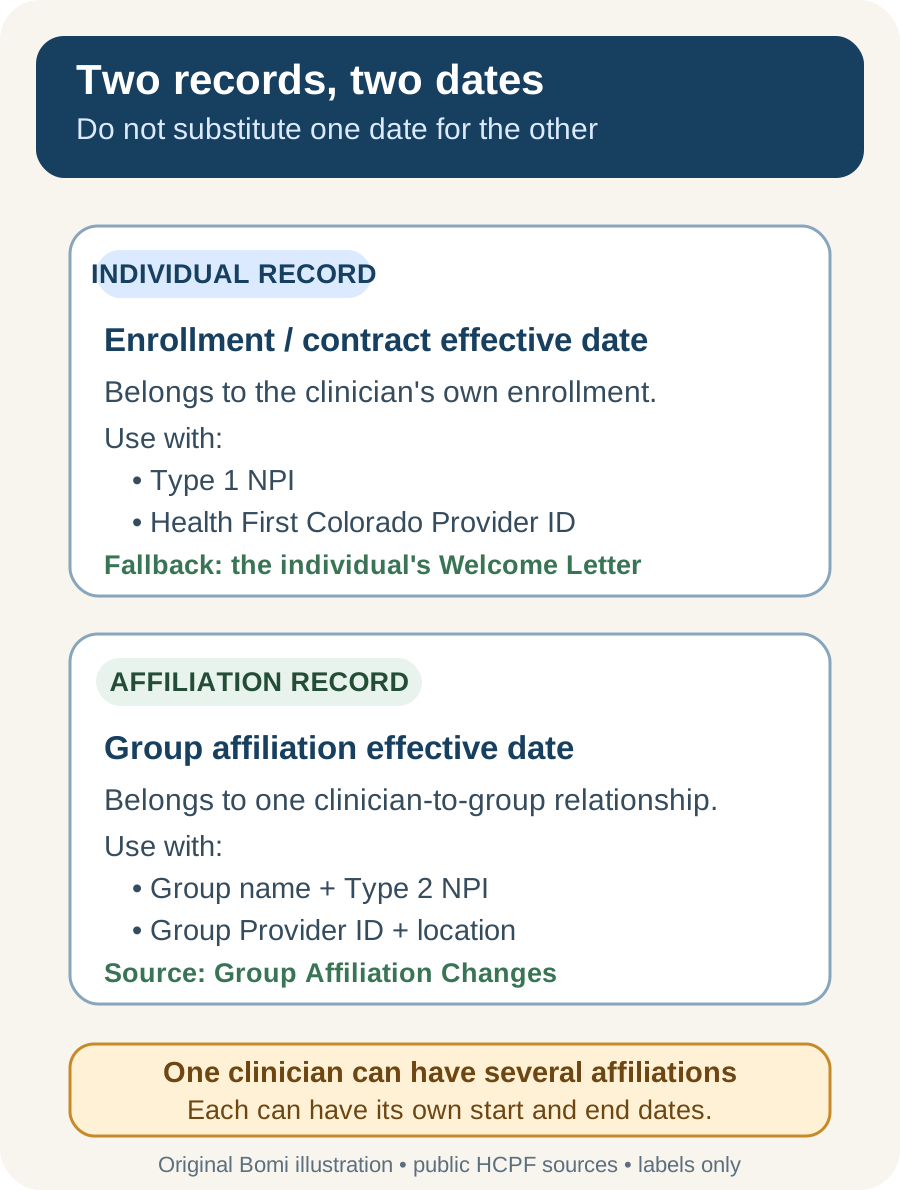
Illustration, not a portal screenshot. Based on HCPF’s Provider Enrollment Manual (revised January 20, 2026) and its current affiliation-review reminder. No real provider information is shown.
Before You Sign In
Use the individual provider profile. An individual-within-a-group enrollment is separate from the group enrollment. If you start in the group profile, you may see “Provider Affiliation Changes” instead of the individual’s “Group Affiliation Changes” view.
Use your own account. If another person is doing the lookup, that person should use their own delegate access. Never give them the provider’s portal password.
Treat this as a read-only lookup. You do not need to add, end-date, save, or submit an affiliation merely to copy the existing identifiers and dates.
Step-by-Step: Find the Provider ID and Affiliation Date
Open the official portal. Start from HCPF’s Provider Web Portal page rather than a link in an unexpected email. Sign in with your own provider or delegate credentials.
Confirm that you are viewing the individual. Match the provider name and Type 1 NPI before copying anything. If your delegate account can switch among providers, select the individual clinician rather than the practice group.
Record the individual Health First Colorado Provider ID. HCPF says the ID appears in the blue banner on the portal home page and in the provider’s enrollment Welcome Letter. Copy the value exactly, including any leading zeroes. Do not substitute the NPI; they are different identifiers.
Select Provider Maintenance. From the provider account, choose the Provider Maintenance area.
Select Provider Maintenance again. HCPF’s Legal Entity Change Form, revised July 2024, explicitly directs providers to click Provider Maintenance and then click Provider Maintenance again before completing a maintenance request.
Open Group Affiliation Changes. HCPF’s May 2024 provider reminder specifically directs providers to this panel to confirm or update group and affiliation records.
Find the intended group and location. Match the group name, Type 2 NPI, Health First Colorado Provider ID, and service location. Do not assume two rows with similar group names are the same location.
Record the affiliation dates. Copy the effective or start date and any end date displayed for that exact affiliation. Label it “group affiliation effective date” in your handoff.
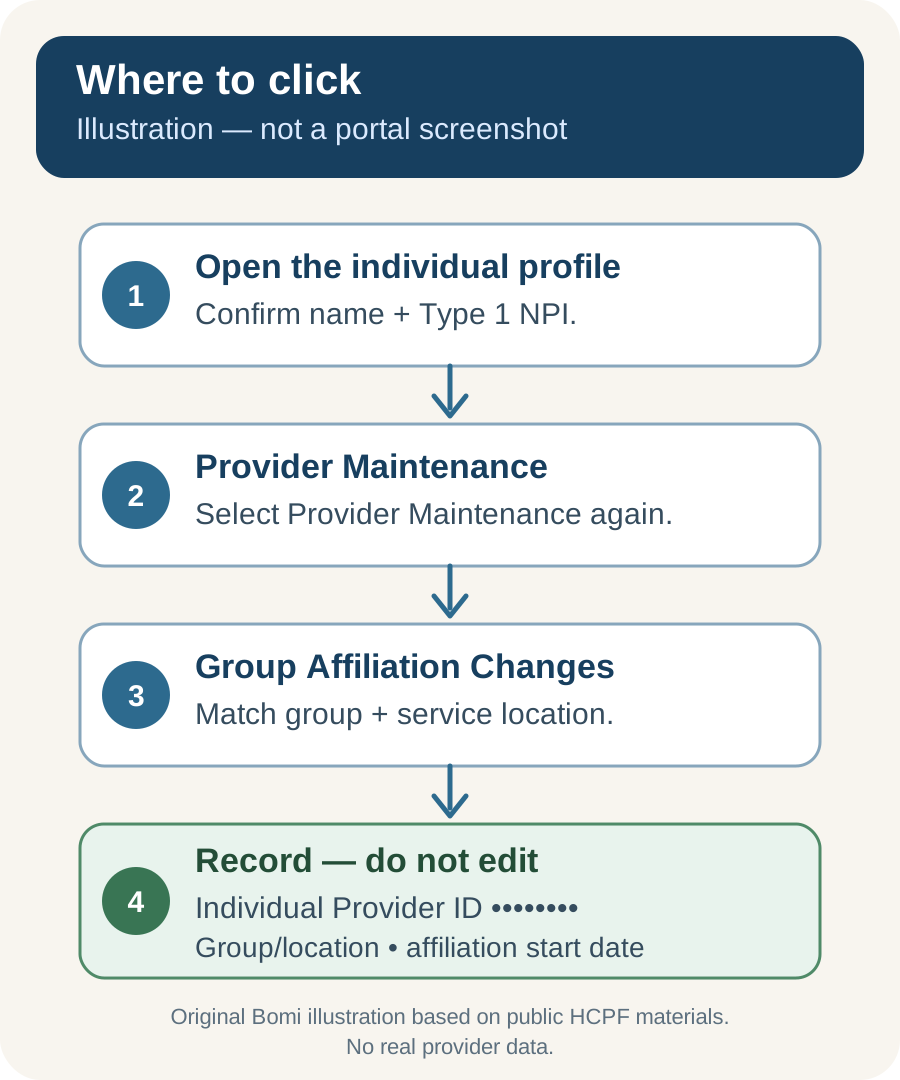
Illustration, not a portal screenshot. Current HCPF 2026 enrollment and billing guidance directs already-enrolled individuals to the Affiliations section of the Provider Maintenance Guide, and the HCPF affiliation reminder names the Group Affiliation Changes panel. The two Provider Maintenance selections are independently confirmed by HCPF’s Legal Entity Change Form revised July 2024, and HCPF’s June 2024 public training deck reproduces the Provider Maintenance Quick Guide table of contents with its Affiliations section. Authenticated screens are not exposed in those public materials, so this guide uses an original diagram rather than presenting an old interface as current.
If You Need the Individual Enrollment Effective Date
The group-affiliation panel does not turn an affiliation start date into the clinician’s individual enrollment date. For the individual enrollment or contract effective date, find the Welcome Letter issued for the clinician’s individual enrollment—not the group’s letter.
HCPF’s January 2026 enrollment manual says the requested enrollment effective date may be backdated subject to approval, and that the Welcome Letter contains the approved backdated contract effective date. That approved date—not merely the date requested on the application—is the date to report.
Search for the individual Welcome Letter. Match the provider name, Type 1 NPI, and Health First Colorado Provider ID before using its date.
Label the evidence. For example: “Individual enrollment effective date — source: individual Welcome Letter.”
If the letter is unavailable, do not infer the date. Use the current contact route on HCPF’s Provider Contacts page to ask Provider Services to confirm the individual enrollment record.
What You Can Send Your Billing or Credentialing Team
HCPF’s provider-authentication notice says a third-party vendor or billing agency checking claim status or provider enrollment information needs both the NPI and Health First Colorado ID. For a trusted team working for your practice, send only the fields needed for the task through your normal secure business channel:
Provider’s full name and Type 1 NPI.
Individual Health First Colorado Provider ID.
Individual enrollment effective date, clearly labeled with its source.
Group name, Type 2 NPI, group Health First Colorado Provider ID, and service location.
Group-affiliation effective date and end date, if one is displayed.
A tightly cropped screenshot of the relevant portal row or Welcome Letter section can be useful. Before sending it, remove or cover unrelated client information, Social Security or tax information, banking details, other providers’ records, security prompts, and account credentials.
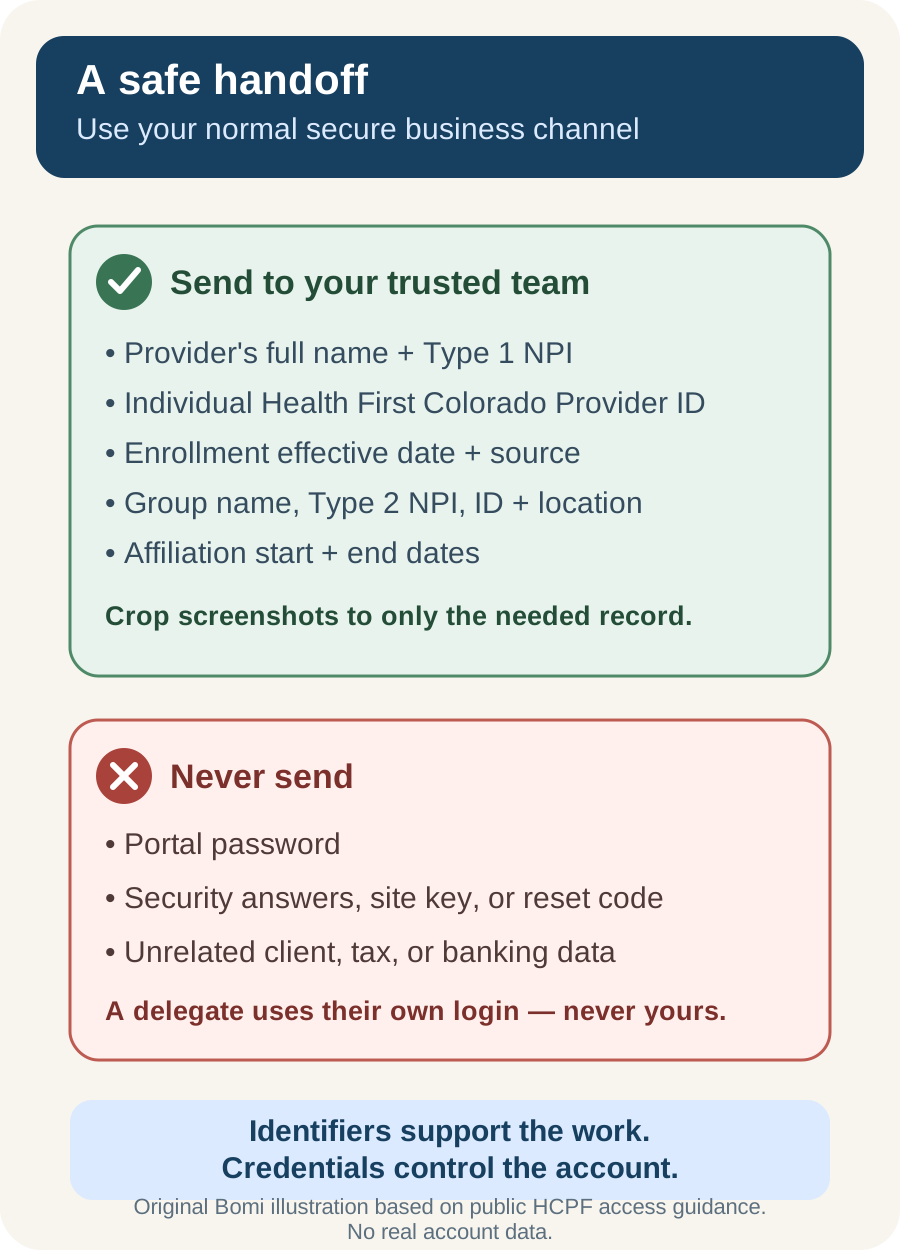
Original security-boundary illustration. Based on HCPF’s provider ID and billing-vendor notice and its 2025 delegate password guidance. It contains no real account or provider data.
Never Share the Portal Password
The password is not part of the handoff. Never send a Provider Web Portal password to a biller, credentialer, colleague, or support person. Do not send security-question answers, password-reset codes, or the portal site-key token either.
HCPF provides separate delegate accounts for this reason. The provider-profile administrator creates the delegate, and the delegate uses and resets their own password. Separate access preserves accountability and can be removed without changing the provider’s own credentials.
Common Snags
You see Provider Affiliation Changes, not Group Affiliation Changes. You are likely viewing the group profile. Switch to the individual clinician before recording the individual Provider ID and group relationships.
The same practice appears more than once. Compare the group Provider ID, Type 2 NPI, and service location. Record the date from the row that matches the billing location in question.
The Group Affiliation Changes link is missing. Do not guess at the relationship or submit an unrelated maintenance request. Confirm that you are in the individual profile, then use the individual Welcome Letter and HCPF Provider Services if the needed record is still unavailable.
The requested date and approved date differ. Use the approved contract effective date from the Welcome Letter. HCPF states that requesting a backdate does not guarantee approval.
Related Colorado Medicaid Guide
If your group is evaluating its enrollment type, read Colorado Medicaid PT 77 Guide for the separate question of when behavioral-health-only groups may need PT 77.
Official Sources and Currency Note
HCPF Provider News — Group and Provider Affiliation Updates, May 20, 2024
HCPF Provider News — delegate password process, June 9, 2025
Portal note: HCPF can change labels or navigation. This article was verified against the public sources above on August 31, 2026. If the live portal differs, stop before editing and follow the current HCPF quick guide or contact Provider Services.
Frequently Asked Questions
Is my Health First Colorado Provider ID the same as my NPI?
No. The NPI is a national identifier, while the Health First Colorado Provider ID identifies the provider record in Colorado Medicaid. Copy both exactly and label them separately.
Is the group affiliation effective date my enrollment effective date?
Not necessarily. The individual enrollment effective date belongs to the clinician’s enrollment record. The group affiliation effective date belongs to one clinician-to-group relationship. Use the individual Welcome Letter for the approved enrollment or contract effective date.
Can I send my Provider ID to my billing company?
Yes, to a trusted billing or credentialing team through your normal secure business channel when they need it for authorized work. HCPF says billing vendors checking claims or enrollment information need the NPI and Health First Colorado ID. Do not send portal credentials.
Can my biller use my Provider Web Portal password?
No. Never share the provider’s password or security information. Create separate delegate access so the biller uses their own user ID and password.
What if I cannot find the individual Welcome Letter?
Do not infer the enrollment date from the group-affiliation row. Use HCPF’s current Provider Contacts page to ask Provider Services to confirm the individual enrollment record.
Growing a group practice?
Bomi helps coordinate insurance operations across providers, payers, rosters, claims, denials, and reporting.
See group support