
Blue Shield CA: Download Your Filed Articles
By George Ruan • August 18, 2026
Last updated: August 18, 2026.
Bottom line: If you formed a California professional corporation and Blue Shield asks for a “state-approved formation filing” or “Articles of Incorporation,” send the endorsed Articles PDF from the California Secretary of State. It is the initial filing marked “-FILED-” with your corporation’s File No. and Date Filed—not your Statement of Information, filing acknowledgment, business license, or business plan.
The wording makes this sound like two documents. For a California professional corporation formed through bizfile Online, it usually describes one: the state-endorsed copy of the Articles of Incorporation that created the corporation.
Sections
What Are Articles of Incorporation?
Your Articles of Incorporation are the formation document filed with the California Secretary of State to create your professional corporation. After the filing is accepted, the state returns an endorsed copy marked “-FILED-.” That copy shows a File No. (your entity number) and Date Filed. Newer California entities use a 12-character number beginning with “B,” such as the fictional format B2026XXXXXXX.
What Is a State-Approved Formation Filing?
“State-approved formation filing” is Blue Shield’s plain description of the filing the Secretary of State accepted to form the legal entity. For a California professional corporation formed through bizfile, the endorsed Articles PDF is that approved filing. The Business Entity Filing Acknowledgment letter is only a receipt or notice, and a Statement of Information is a later update about the corporation. Neither one replaces the endorsed Articles.
What the Real State Forms Look Like
Articles of Incorporation (ARTS-PC): Below is the actual blank professional-corporation form published by the California Secretary of State. A filed copy may use this layout or another valid Articles layout. On an endorsed copy, look in the office-use area for “-FILED-,” a File No., and a Date Filed.
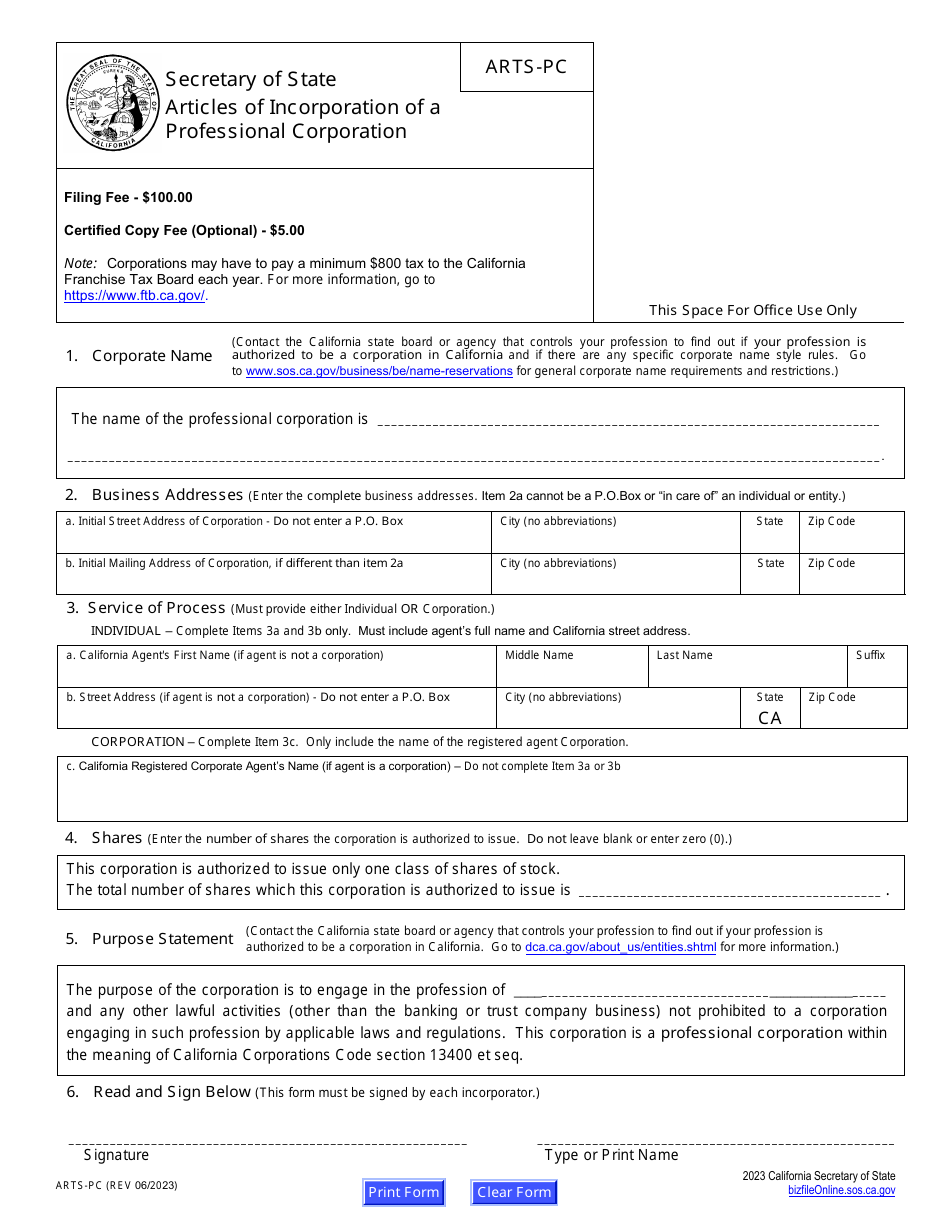
Official California Secretary of State ARTS-PC form, revision 06/2023. This is a blank form for recognizing the layout—not the endorsed copy you should send. Open the live Secretary of State PDF.
Statement of Information (SI-550)—not the Articles
Compare the title and fields: The official SI-550 below asks for the corporation’s current addresses, officers, directors, and agent for service of process. Those are ongoing record details. The form does not create the corporation, even if its Filing Acknowledgment says the submission was accepted.
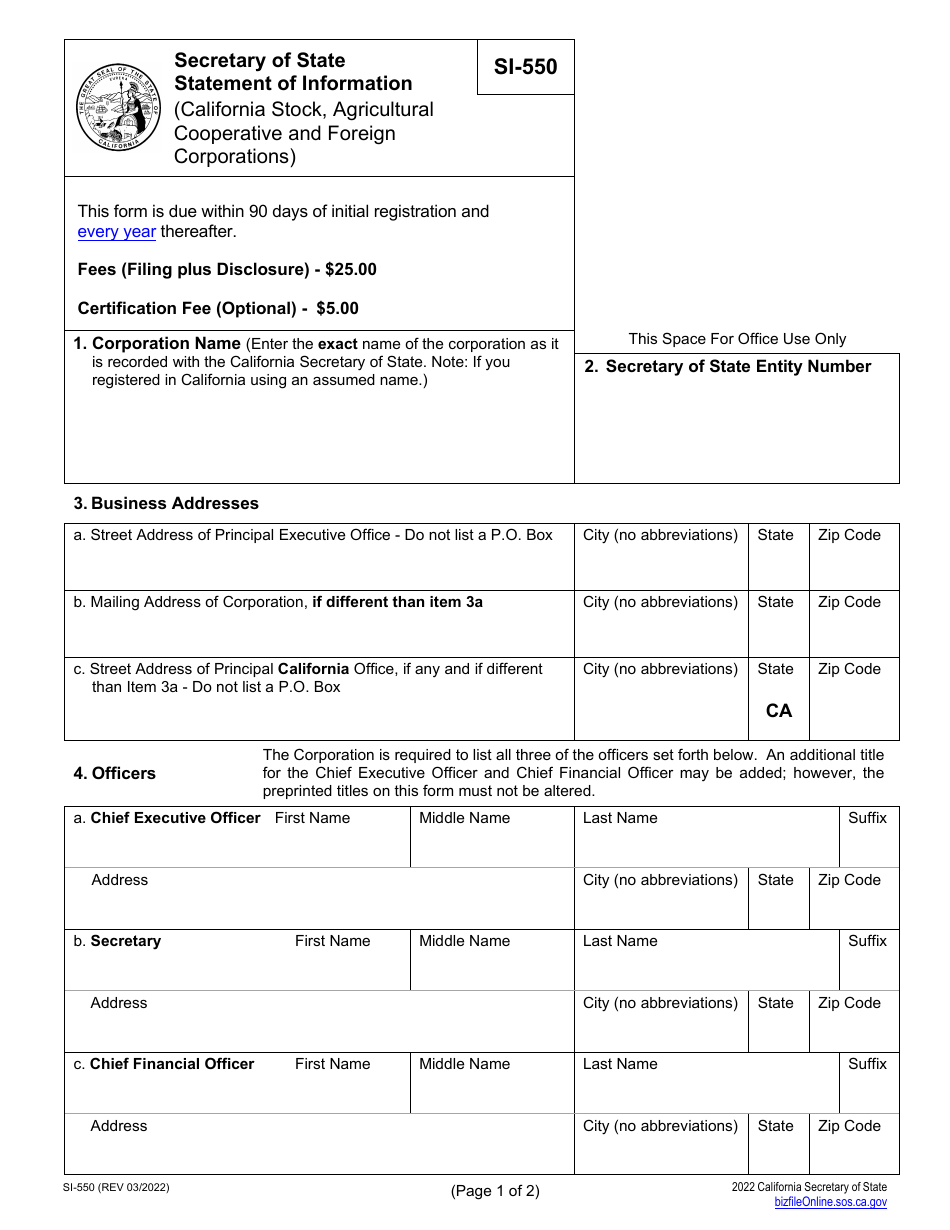
Official California Secretary of State SI-550 form, revision 03/2022. Online-filed Statements and acknowledgment letters can have a different layout; the “Statement of Information” title is the giveaway. Open the live Secretary of State PDF.
Why Blue Shield of California Asks for It
Blue Shield’s current individual practitioner record application and provider group/facility record application say to submit an approved California filing when claims will use a legal entity name filed with the Secretary of State. The forms explain that Blue Shield uses the submitted information to establish a practitioner or group billing record for claims processing.
In practical terms, Blue Shield needs to verify that the professional corporation that will contract, bill, and receive payment actually exists. The legal entity name on the endorsed Articles should line up with the entity name and tax ID on your application and W-9. Your clinical license proves who you are as a therapist; the Articles prove which corporation is the billing entity.
What These Documents Are Not
Do not substitute any of these when the request is for the state-approved formation filing or Articles of Incorporation:
A city or county business license.
A Statement of Information (SI-550 or SI-200) or the Business Entity Filing Acknowledgment for that statement.
An IRS EIN assignment letter, such as CP 575.
A fictitious business name statement.
A business plan.
A W-9.
Some of these may be requested elsewhere in the packet. They simply answer different questions. For example, a W-9 confirms the taxpayer name and TIN; it does not prove that California accepted the corporation’s formation filing.
How to Download the Endorsed Articles for Free
Open the California bizfile Online business search. Go directly to the business search. You do not need to sign in to search or download a plain copy.
Search for the corporation. Use the exact entity name or entity number. For an older corporation number that begins with “C,” enter the number without the leading “C.” Newer corporation numbers beginning with “B” should be entered as shown.
Open the entity record. Click the correct entity row in the results. A detail drawer opens on the right side of the page. Confirm the legal name before continuing.
Click “View History.” This opens the list of documents the Secretary of State has accepted for that entity.
Find the “Initial Filing” row. Look for Amendment Type “Initial Filing.” Its Control ID should match your entity number. Do not choose the row labeled “Statement of Information”—that downloads the SI, not the Articles.
Click “Image Download.” The downloaded file is the free plain copy of the endorsed Articles of Incorporation.
Check the PDF before sending it. The document should show your exact corporate name and the state endorsement with “-FILED-,” File No., and Date Filed. Give the file a clear name such as Endorsed Articles of Incorporation.pdf.
If bizfile is slow: The search can lag or show “An error has occurred” when the site is under load. Wait a minute and retry. You do not need to pay for a certified copy unless the payer specifically says certification is required. In Bomi’s experience, Blue Shield roster and credentialing packets accept the free endorsed copy; that is Bomi’s operational experience, not a published Blue Shield rule.
What If You Are a Sole Proprietor?
A sole proprietor who has not incorporated does not have Articles of Incorporation. Do not create or purchase a document just to fill the slot in the packet.
Blue Shield’s current individual practitioner record form makes the approved-filing request conditional: it applies if you intend to submit claims using a legal entity name filed with the California Secretary of State. The same form asks for a signed W-9 or IRS tax document if you will submit claims using an EIN. Blue Shield’s current group/facility record form says a non-incorporated provider using a fictitious name should submit the county-issued Fictitious Name Statement.
Those public forms do not identify one universal replacement document for every non-incorporated behavioral-health contracting path. Tell your credentialing contact that you are a sole proprietor with no corporation, then ask which individual-provider documents apply to your record. If Bomi manages your credentialing, send us the request and we will confirm the correct lane before anything is submitted.
Send This to Your Biller
The endorsed Initial Filing / Articles of Incorporation PDF—not the Statement of Information or its acknowledgment.
The exact legal entity name shown on the Articles.
The entity number and Date Filed shown in the endorsement.
Your signed W-9 and organizational NPI, if separately requested. These should use the same legal entity identity as the application.
A note if you are not incorporated, so your biller does not keep looking for Articles that do not exist.
If your biller also needs payer-portal access, see How to Authorize Your Biller in Availity.
Want Bomi to keep the packet straight? Bomi helps therapy practices collect the right entity documents, complete credentialing applications, and follow up with payers without turning every document request into a scavenger hunt. Talk to Bomi about credentialing.
This post is for general operational education and is not legal or tax advice. Confirm the entity structure that fits your practice with your attorney and tax professional.
Sources
Blue Shield of California: Join the Behavioral Health provider network
Blue Shield of California: Individual Practitioner Application Form (January 2026)
Blue Shield of California: Provider Group/Facility Application Form (January 2026)
California Secretary of State: Business Entity Frequently Asked Questions
California Secretary of State: Business Entities Records Request
California Secretary of State: Articles of Incorporation of a Professional Corporation (ARTS-PC)
California Secretary of State: Statement of Information (SI-550)
Need help getting payer-ready?
Bomi helps with CAQH, payer applications, credentialing packets, attestations, effective dates, roster updates, and credential management.
Get credentialing help