
Give Your Biller Arizona Medicaid APEP Access
By George Ruan • August 12, 2026
Last updated: August 11, 2026.
Use the existing APEP group domain. The current Domain Administrator should add your biller as another Domain Administrator under the group or organization enrollment. Do not share the owner’s password, and do not start a second enrollment when the same TIN and Type-2 NPI are already in APEP.
This guide is for an Arizona practice that already has an AHCCCS Provider Enrollment Portal (APEP) record for its group or organization, including a PT01 Group Biller enrollment. It shows the provider-side steps for granting a billing or credentialing partner access with their own APEP username.
Sections
What You Need Before You Start
A current group Domain Administrator. This is usually the person who submitted the approved enrollment or someone that person added later.
The biller’s exact APEP username. Ask your billing or credentialing contact for the username tied to their own APEP account. Do not create or share a generic office login.
The correct provider domain. Choose the practice’s group or organization record—not an individual clinician’s domain. Confirm the legal name, AHCCCS ID, and Type-2 NPI before adding access.
No passwords or full identity data. The ordinary group-delegation path requires the biller’s APEP username. It does not require giving the biller your password, full Social Security number, date of birth, or identity document.
Add the Biller as a Domain Administrator
Sign in with the current Domain Administrator’s account. Open the APEP application from the AHCCCS APEP page.
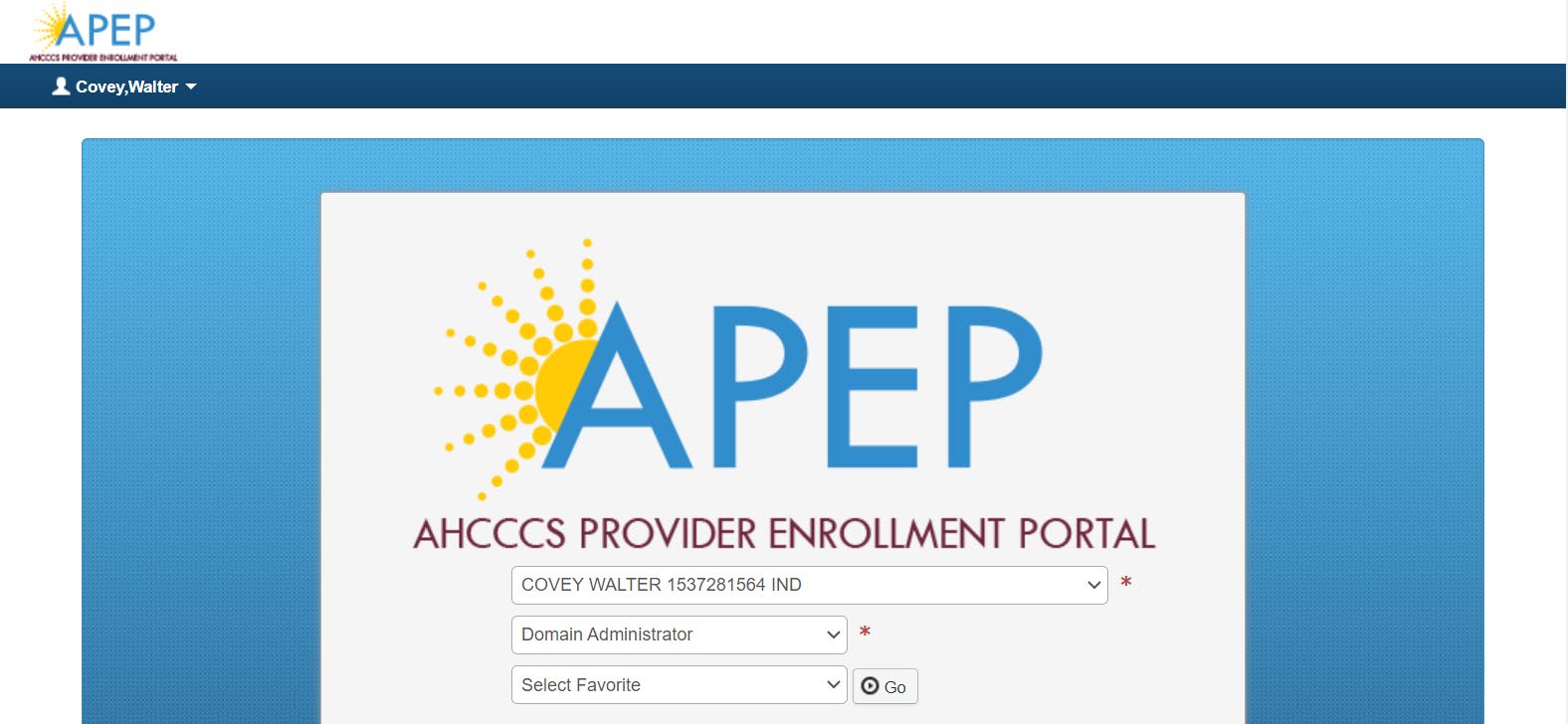
Select the practice’s provider domain. In the first dropdown, choose the correct group or organization. In the second dropdown, choose Domain Administrator, then select Go.
Choose the correct provider domain and the Domain Administrator profile.
AHCCCS uses sample individual-provider data in its guide. Your dropdown should show your practice’s group or organization record.
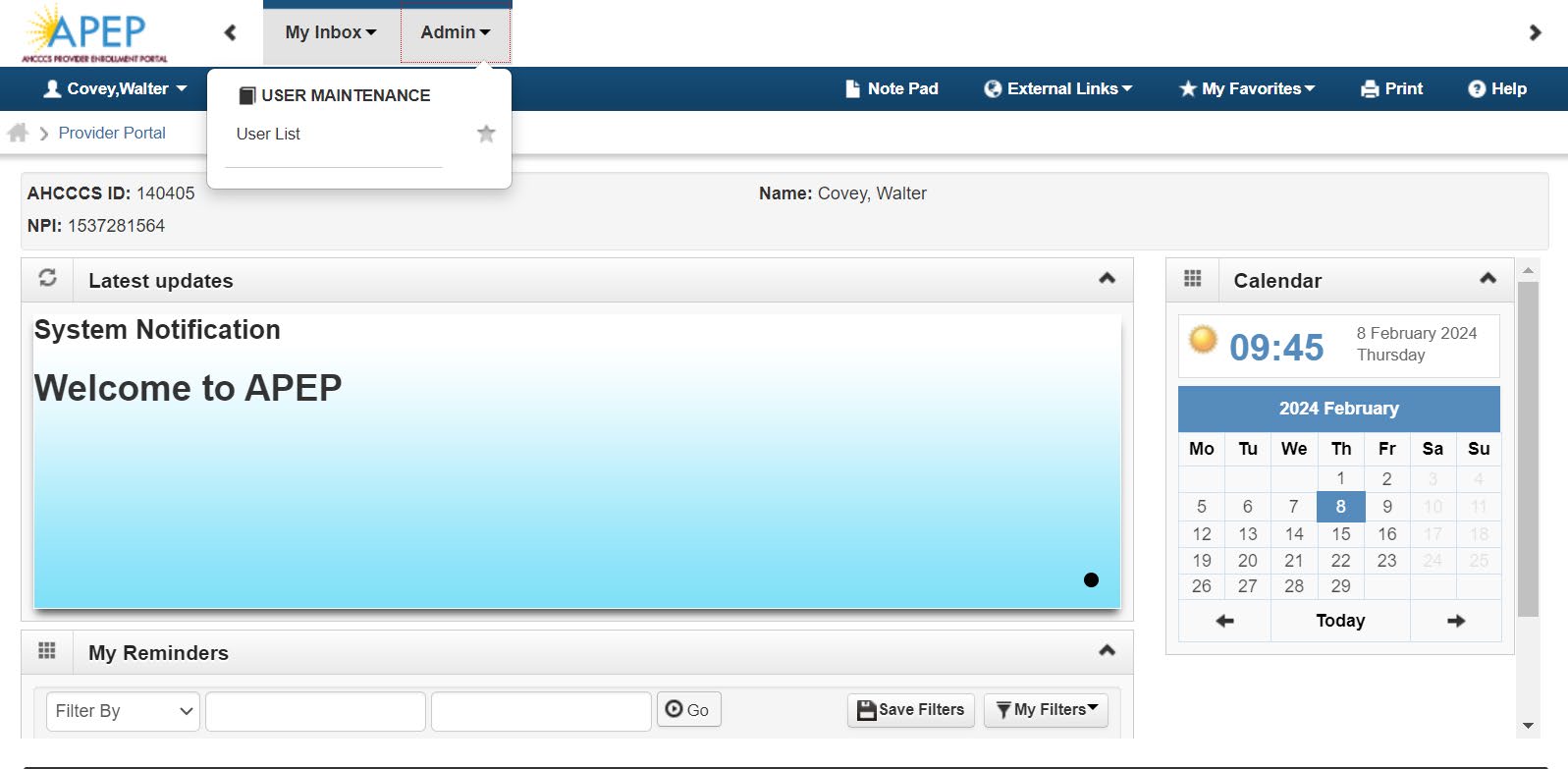
Open the user list. From the APEP navigation, choose Admin, then User List.
Open Admin, then User List.
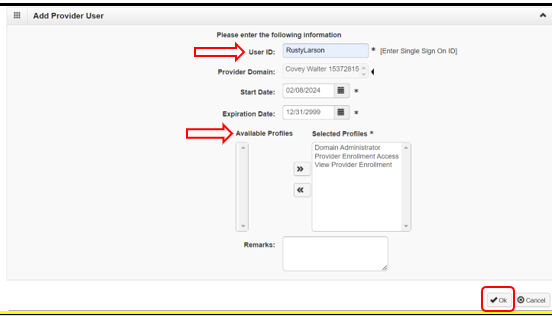
Add the new provider user. On Manage Users, select Add. Enter the biller’s exact APEP username. If the start date is blank, enter today’s date.
Assign all three AHCCCS profiles. Move Domain Administrator, Provider Enrollment Access, and View Provider Enrollment into Selected Profiles. AHCCCS lists all three in its current instructions for adding another Domain Administrator.
Review, then select OK. Make sure the username and provider domain are correct before adding the user.
Enter the biller’s username and move all three profiles into Selected Profiles.
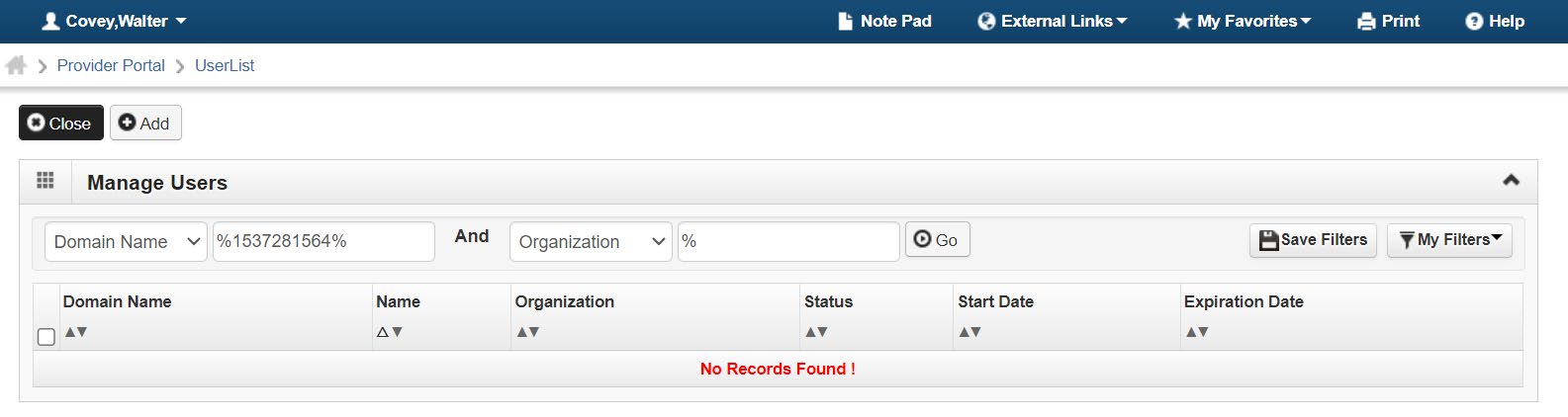
Confirm the access. Return to Manage Users. Search by Domain Name using a percent sign, the provider NPI, and another percent sign with no spaces—for example, %1234567890%. Set the second filter to Organization, enter %, and select Go.
Verify the biller appears. Confirm the expected person or organization is listed as an administrator for the correct provider domain.
Search Manage Users by the provider NPI and verify the new administrator.
Screenshot source: AHCCCS, Domain Access in the AHCCCS Provider Enrollment Portal (PEP-901), pages 7–9, revised May 12, 2026. Names and identifiers shown are sample data from the AHCCCS guide.
What This Permission Allows
AHCCCS warns that anyone listed as an administrator can view, edit, or change the application. Grant access only to a trusted person who is authorized to maintain the provider enrollment. Review the user list when staff or vendors change, and remove access when the relationship ends.
The biller should use their own APEP login after access is added. They should select the group domain and Provider Enrollment Access profile before opening a maintenance or modification request.
Do Not Use Individual Self-Service for a Group
APEP also has a Request Domain Administrator Access identity-verification option. AHCCCS explicitly says that route applies only to individual provider enrollments and does not apply to groups or organizations.
The individual-only route asks for first name, last name, date of birth, Social Security number, and AHCCCS ID. AHCCCS’s April 2026 notice says five failed attempts temporarily lock the APEP user for 30 minutes. Do not use a clinician’s identity fields to try to unlock a PT01 group domain.
If Nobody Knows the Current Domain Administrator
Call AHCCCS Provider Assistance. The current AHCCCS FAQ says the call center can provide the name and/or organization of the current domain owner. Call 602-417-7670 in Maricopa County, 1-800-794-6862 elsewhere in Arizona, or 1-800-523-0231 from out of state.
Try to resolve access with that owner. Ask the existing owner to follow the steps above and add the biller’s APEP username.
Escalate through the AHCCCS Solutions Center if needed. If the current owner cannot or will not grant access, submit a Solutions Center inquiry with the subject Domain Transfer. The Provider Services Call Center cannot complete the transfer itself.
What AHCCCS Requires for a Domain Transfer
AHCCCS requires a letter signed by an owner or key individual already named on the enrollment. The letter must include:
Owner or key individual’s name
Provider’s AHCCCS ID and NPI
Owner or key individual’s last four SSN digits and DOB
Name of the current domain holder
APEP username of the person who needs access
Explanation of attempts to resolve access with the current domain owner
Copy of the owner or key individual’s government-issued ID
Send sensitive transfer evidence directly to AHCCCS. Do not send a full SSN, DOB, driver’s license, portal password, or identity document to a biller by ordinary email. The current PEP-901 guide says incomplete Domain Transfer tickets are closed and gives a response goal of 10 days for complete requests.
After the Biller Has Access
Confirm the legal name, TIN, Type-2 NPI, provider type, AHCCCS ID, status, ownership, and addresses on the existing record.
Check for an open enrollment, revalidation, modification, or request for information before starting new work.
Use maintenance or modification for the existing provider record. Do not create a duplicate application for the same TIN and NPI.
Keep submission, approval, and group-affiliation evidence after any authorized update is completed.
Official AHCCCS Sources
Domain Access in APEP (PEP-901) — current group-access and domain-transfer instructions.
APEP changes effective April 26, 2026 — individual self-service scope and lockout rules.
AHCCCS Provider Enrollment FAQ — current domain-owner and account guidance.
AHCCCS Provider Enrollment contact page — Provider Assistance phone numbers and ticket guidance.
Growing a group practice?
Bomi helps coordinate insurance operations across providers, payers, rosters, claims, denials, and reporting.
See group support